

I'm Henry van den Broek, an indie developer building apps I want to use: LinkaGoGo, a 25+ year-old bookmark manager; Reken, a reactive HTML framework; Mardo, a markdown editor; Weft, a personal space on the social web; plus word games and cycling tools.

Born in Amsterdam, I spent my career in enterprise software at IRI Software and Oracle before moving to the US. I've been building full time since retiring in 2022.

Off the bike I code, cook and blog; on it, I've ridden Paris-Brest-Paris twice and race cyclocross.

Posts tagged bookmarks · All posts · Feed for this topic

Mardo, a markdown browser and authoring tool, needed to organize and store bookmarks. Made sense to store them in a markdown file. The Open Markdown Bookmark Format (OMBF) defines how folders and bookmarks are stored. It also describes how vendors can extend it with their own attributes.

General · hbroek/open-markdown-bookmark-format

The specification has its own website (https://open-markdown-bookmark-format.henryvandenbroek.com). For feedback, comments, or if you (want to) support it, visit the github repository open-markdown-bookmark-format.
markdownbookmarksmardomarkdown webbonbonweb

LinkaGoGo, my online bookmark manager, can show its pages as markdown to a markdown browser. For shared (public) folders and bookmarks, that has worked fine from the start. For private ones, you had to give the browser an API key. Mardo, my markdown browser and editor, has a place for that, Site Credentials, but copying a key out of one app and into another is a hassle. I wanted to make it easier.

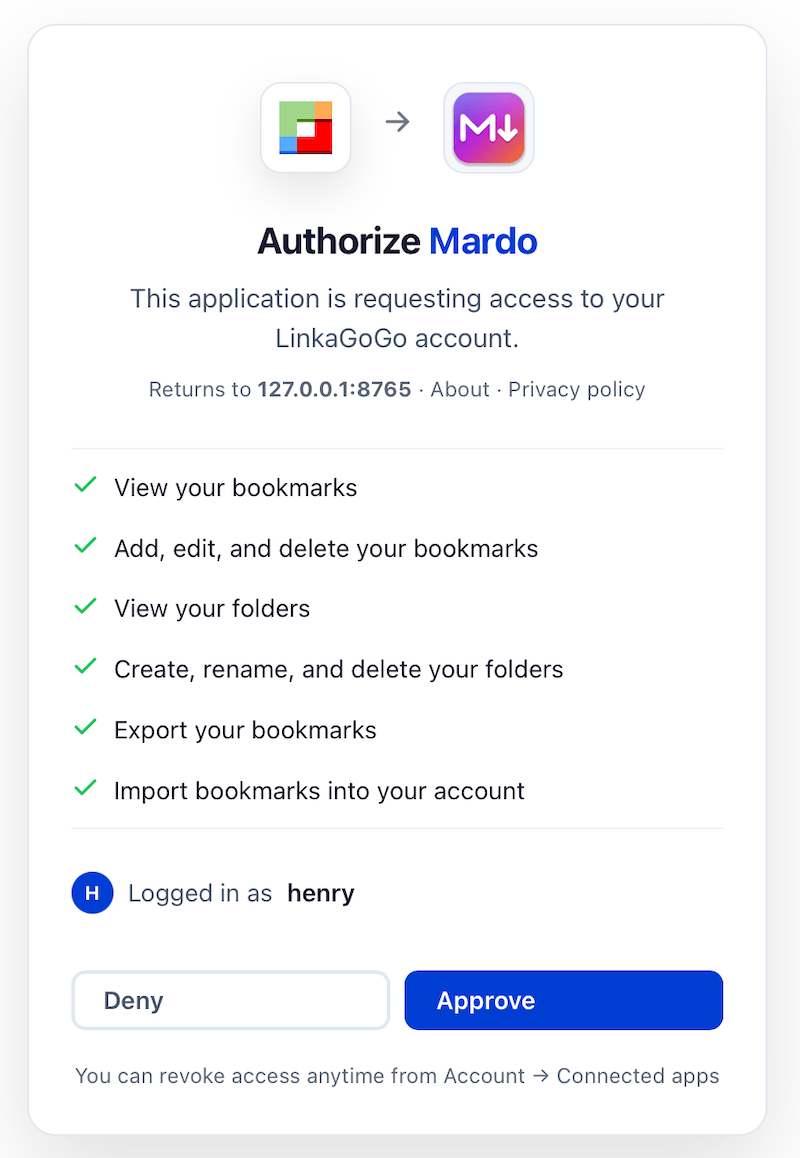
LinkaGoGo authorize Mardo dialog

I looked at a few options and settled on OAuth, the standard way an app asks a website for permission on your behalf. It is a good fit for this case: a desktop app (Mardo) that needs to sign in to a web service (LinkaGoGo). LinkaGoGo already had most of the server side. It needed only a few tweaks. Mardo got the client side.

Now when Mardo opens a private LinkaGoGo page and you aren't signed in, the page offers a "Sign in with LinkaGoGo" button. Press it, and your browser opens LinkaGoGo's own page asking whether Mardo may have access. Approve, and you're back in Mardo with the page open. There is nothing to copy or paste. Mardo never sees your password, and you can sign out of LinkaGoGo from Mardo at any time.

It isn't specific to LinkaGoGo. Any site that publishes its sign-in details in the standard way can work like this, so I'm hoping to try it with other services next.

OAuthauthorizationsign inLinkaGoGoMardomarkdownmarkdown browserbookmarksAPI keyprivate bookmarks

Mardo, a week of busy work 🦡

Mardo is a free, open-source app for reading and writing the web as plain text. Many pages today are written in markdown, a simple way of writing text with a few symbols, such as a # for a heading. Mardo opens those pages cleanly, lets you edit them, and keeps your bookmarks. It's built for people who write online.

image

Since Mardo the Marten joined the website, I've been adding a lot:

  • Bonbon support. Bonbon is a plain-text, markdown-only web started by Dave Winer. Mardo can read it the way it's meant to be read, with arrows to the next and previous post, a site's own search, and pages that reload by themselves when the author changes them.
  • Send to. A new toolbar that sends the page you're reading, or the text you've selected, somewhere else. Post a link to a service, search Google or an AI for your selection, or copy a link neatly formatted. You can make your own, and edit them without leaving Mardo, including on a phone.
  • Page styles. Read in a book-like, newspaper-like or plain style, or use your own.
  • Better writing tools. A live preview next to the editor, a cheatsheet for the symbols, find and replace, and an AI helper that now knows the date and where your cursor is.
  • Pages that live in the address. A whole page can be packed into a single long web address you can copy, share and edit.
  • Now on Android, and on iPhone and iPad.

Where to get it right now

  • Mac, Windows and Linux: version 0.18.0 is on the release page: https://github.com/hbroek/mardo/releases/tag/v0.18.0
  • iPhone and iPad: on the App Store. It's the previous version, and the newest is on its way.
  • Android: submitted to Google Play and in review. I hope it will be out early next week.

More at https://mardo.henryvandenbroek.com

mardomarkdownbonbontextcastingopen sourcewritingbrowsereditorbookmarksandroid